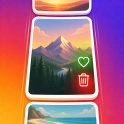
Browse by moment
Big Sur · May 18momentfold Your library, in moments. Related photos are grouped so a weekend away reads as one story, not hundreds of files. Swipe up for the next moment, sideways through the photos inside it.
MomentFoldPrivate photo culling for iPhone and iPad
MomentFold groups related photos into moments and gives you one decision at a time. Explore how browsing, sorting, and final review work below.
Illustrated walkthrough · These are static previews, not interactive app screens.
momentfold Your library, in moments. Related photos are grouped so a weekend away reads as one story, not hundreds of files. Swipe up for the next moment, sideways through the photos inside it.
momentfold A faster way to decide. Rail actions apply to one photo — keep, trash, archive, undo. The photo-count menu at the top applies to the whole moment, so a burst of nine near-identical shots clears in a single choice.
momentfold Nothing leaves by accident. Trash is only a shortlist. Photos are removed from your library after you look at the batch and confirm through Apple’s own deletion prompt — and photos you marked as favorites are protected along the way.
momentfold One photo, every version. Edits and originals stack as layers instead of cluttering the feed as duplicates. Flip between them, then decide once for the whole stack.
momentfold Cull the part you care about. Search your albums, filter to what is still undecided, and open any result as its own feed — the same screen, the same rail, a narrower pile.
momentfold A weekly pass, not a spring cleaning. Each week MomentFold offers the previous week as a short review session. Start it, leave it, resume where you stopped.
momentfold MomentFold uses Photos access to show and organize your library. Grouping and analysis run on your device using Apple frameworks.
No. Trash is a shortlist. Hold in Trash delays eligibility for Final Review; it never deletes automatically. Deletion still needs your review and Apple’s system confirmation.
MomentFold does not upload your photos, and analysis runs on device. Apple Photos may use iCloud Photos according to your settings.
Archived photos stay in Photos. They simply stop appearing in your review feed.
The number estimates the full resource size of photos staged for deletion. If optimized storage is enabled in Apple Photos, your device may keep smaller local versions, so the space actually freed can be lower.
A calmer camera roll, one scroll at a time.
You’re all caught up.